Version: May 2026 · Reading time: ~15 minutes · Initial setup: ~20 minutes
This guide is for company administrators who use WorkApp.ro for timesheets, daily reporting, and financial analytics of field teams.
1. What is WorkApp and what problems does it solve
WorkApp.ro is the management platform for service companies with field teams (fire safety, installations, maintenance, cleaning, security, telecom, etc.). Unlike classic HR tools, WorkApp ties timesheets to client, intervention and generated revenue, so you see in real time whether a job was profitable.
Problems solved:
- Automated company-wide timesheets with alerts for missing days and overtime.
- Full visibility on revenue per client / per employee / per month.
- Branded PDF & Excel reports, ready for clients or accounting.
- Monthly Executive Brief emailed automatically to admins on day 1 of every month.
- Direct sync with FGO for e-Invoicing to the Romanian Tax Authority (ANAF).
2. Sign In
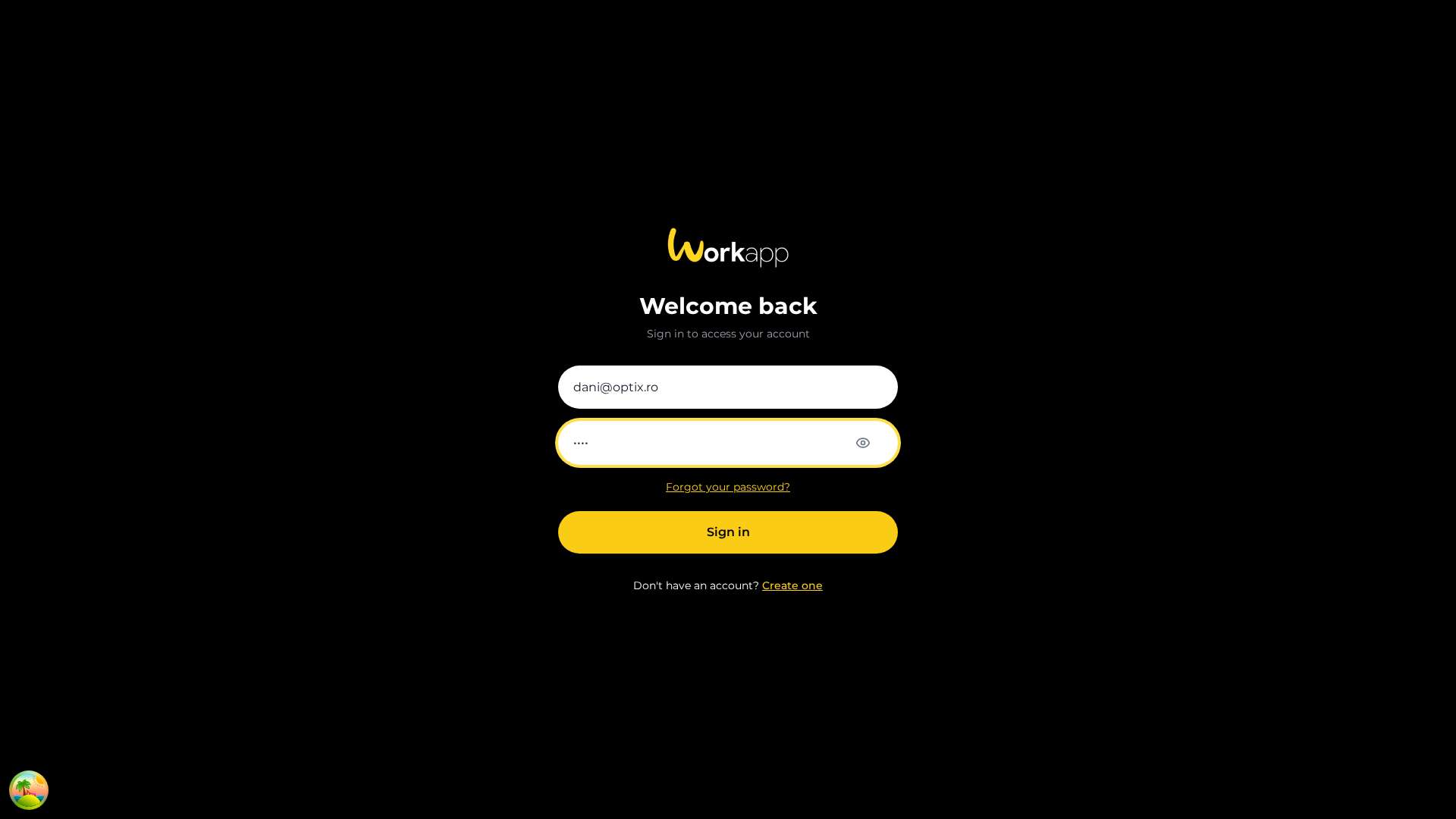
Go to https://workapp.ro and click Sign in.
- Email: the company email used at registration.
- Password: your set password; click the eye icon to reveal.
- "Forgot your password?" — email reset link.
If you enabled 2FA at company level, you'll be asked for the Google Authenticator code after the password.
3. Dashboard (Home)
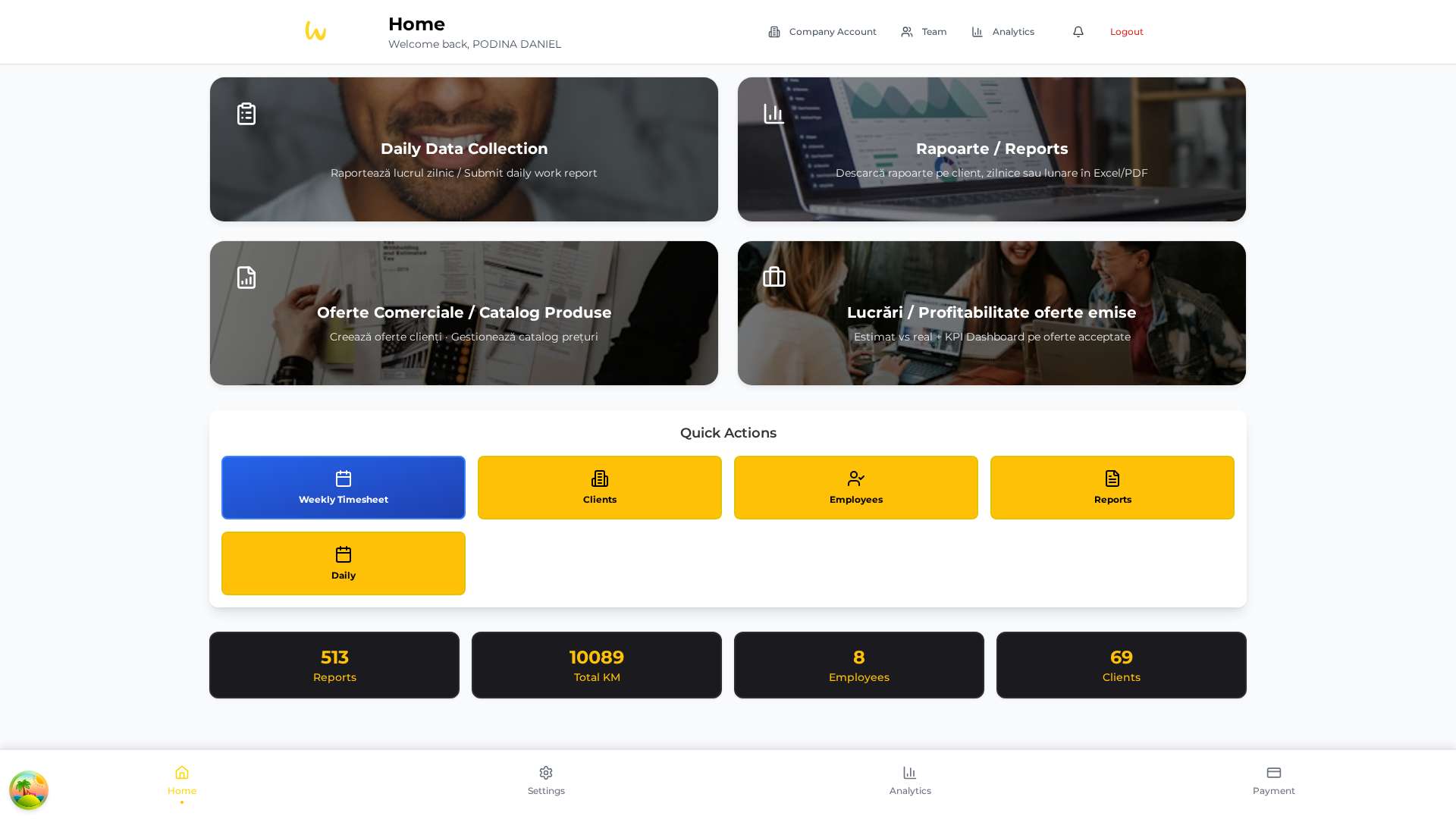
The dashboard is your daily starting point with 3 zones:
3.1. Large navigation cards
Four shortcuts to key modules: Daily Data Collection, Reports, Quotes / Product Catalog, Jobs / Profitability.
3.2. Quick Actions
Weekly Timesheet button (highlighted blue) — direct access to the new Weekly Timesheet screen. Plus: Clients, Employees, Reports, Daily.
3.3. KPI cards (dark background #1A1A1F)
Reports, Total KM, Employees, Clients — all live counters.
4. Weekly Timesheet
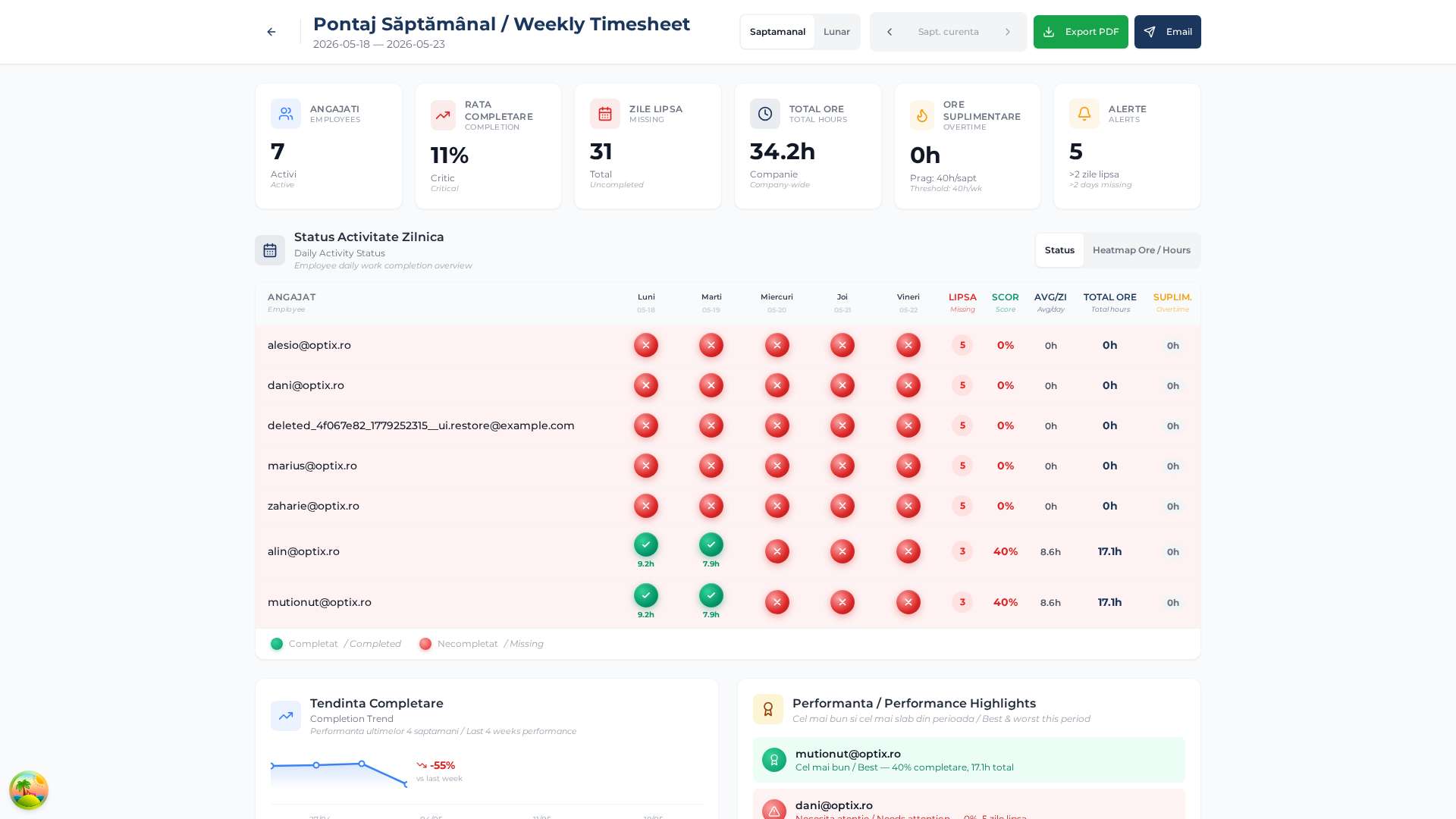
Renamed from "Weekly Daily Data" to "Weekly Timesheet" for clarity. The heart of team monitoring.
Header
- Weekly / Monthly toggle — switches between 5 days (Mon–Fri) and full month.
- Arrows to navigate weeks / months.
- Export PDF (green) — branded PDF download.
- Email (blue) — send the report to admins.
6 KPI cards
- EMPLOYEES — how many are active.
- COMPLETION — % of timesheets filled.
- MISSING — total days not logged.
- TOTAL HOURS — company-wide reported hours.
- OVERTIME — above 40h/week (or working_days × 8h monthly).
- ALERTS — employees with >2 consecutive missing days.
Daily Activity Status table
Mon–Fri columns with ✓ green (completed) or ✗ red (missing), plus MISSING, SCORE, AVG/DAY, TOTAL HRS, OT. Toggle between Status and Hours Heatmap.
Automatic cron: Saturday at 18:00, the report is auto-emailed to all admins and managers.
5. Analytics — Financial Dashboard
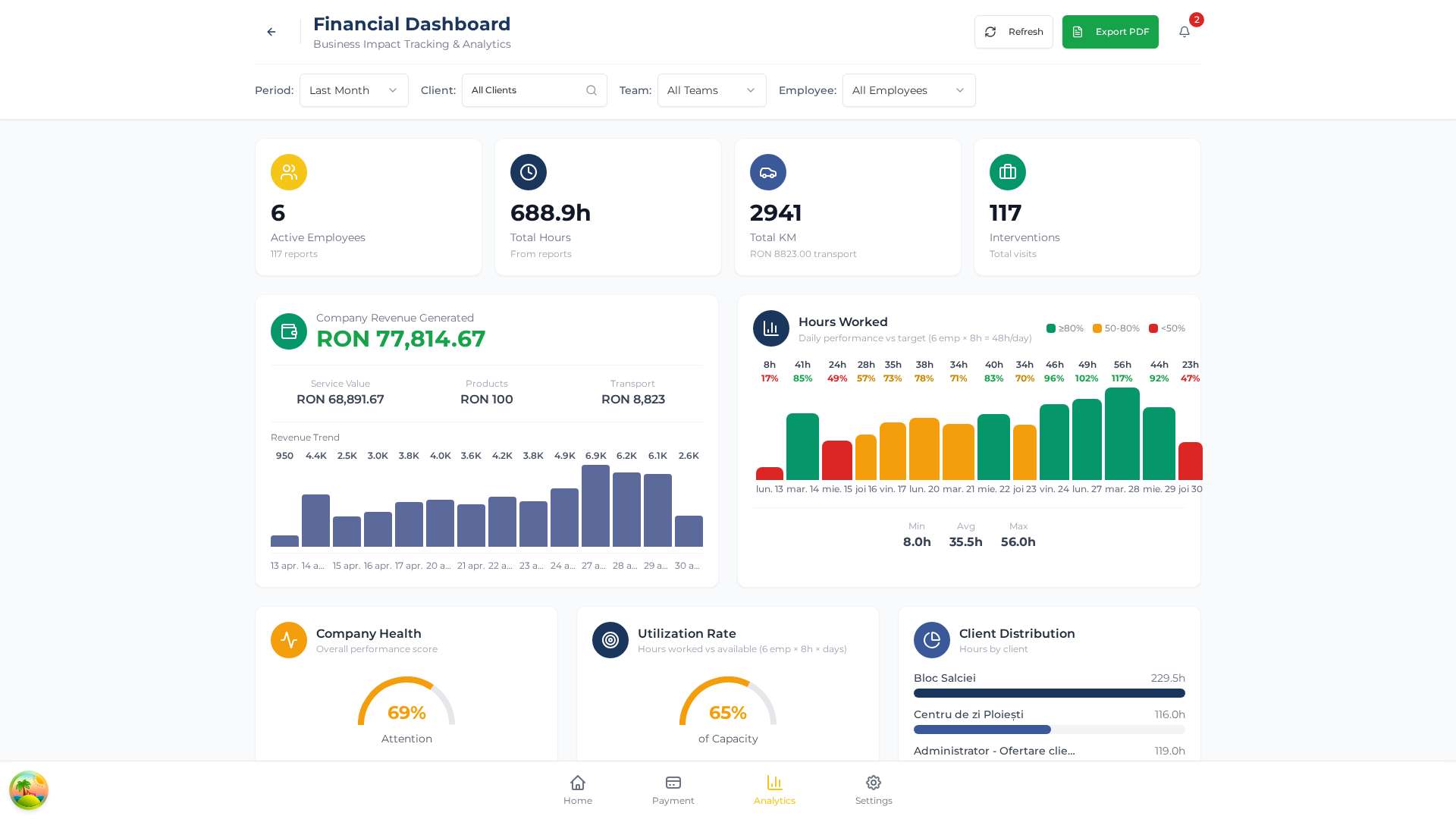
Visual module for fast financial decisions. Filters: Period, Client, Team, Employee.
Top KPIs
Active Employees · Total Hours · Total KM (+ transport value RON) · Interventions.
Company Revenue Generated
Breakdown: Service Value (labor), Products, Transport. Below: Revenue Trend bar chart for the last ~18 days.
Hours Worked
Bar chart color-coded: 🟢 ≥80% target, 🟠 50–80%, 🔴 <50%. Plus Min / Avg / Max.
Bottom cards
Company Health (gauge), Utilization Rate (hours vs. capacity), Client Distribution (top clients by hours).
6. Reports and Monthly Executive Brief ⭐
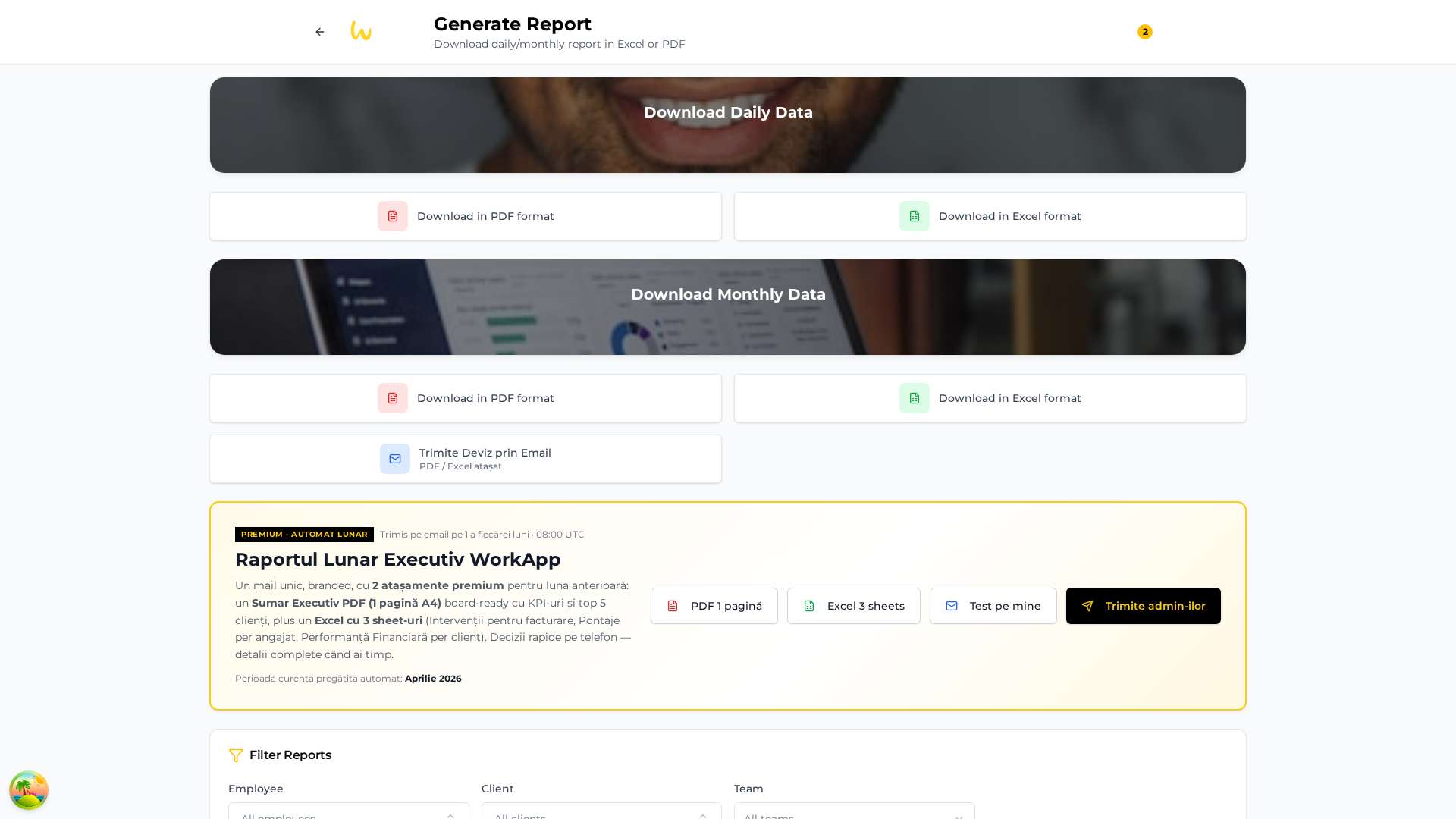
Manual report generation screen, structured in 3 areas:
6.1. Daily / Monthly Data
PDF (mobile-friendly) or Excel (filterable). Plus Email Quote to Client — automatically attaches PDF + Excel.
6.2. Monthly Executive Brief (Premium · Auto Monthly)
Premium black-yellow card with "PREMIUM · AUTO MONTHLY" badge.
What's in the auto email sent on day 1 of each month, 08:00 UTC:
- Branded HTML email with KPI strip + tagline "the best management tool for service companies with field teams".
- Executive Summary PDF (1 A4 page) board-ready with KPIs and Top 5 clients by revenue.
- Excel with 3 sheets: Interventions (billing-ready), Timesheets per employee, Financial Performance per client.
Manual actions on the card: PDF 1 page, Excel 3 sheets, Test on me (just you), Send to admins (idempotent).
Visible indicator: "Current period auto-prepared: <Month Year>".
7. Client Management
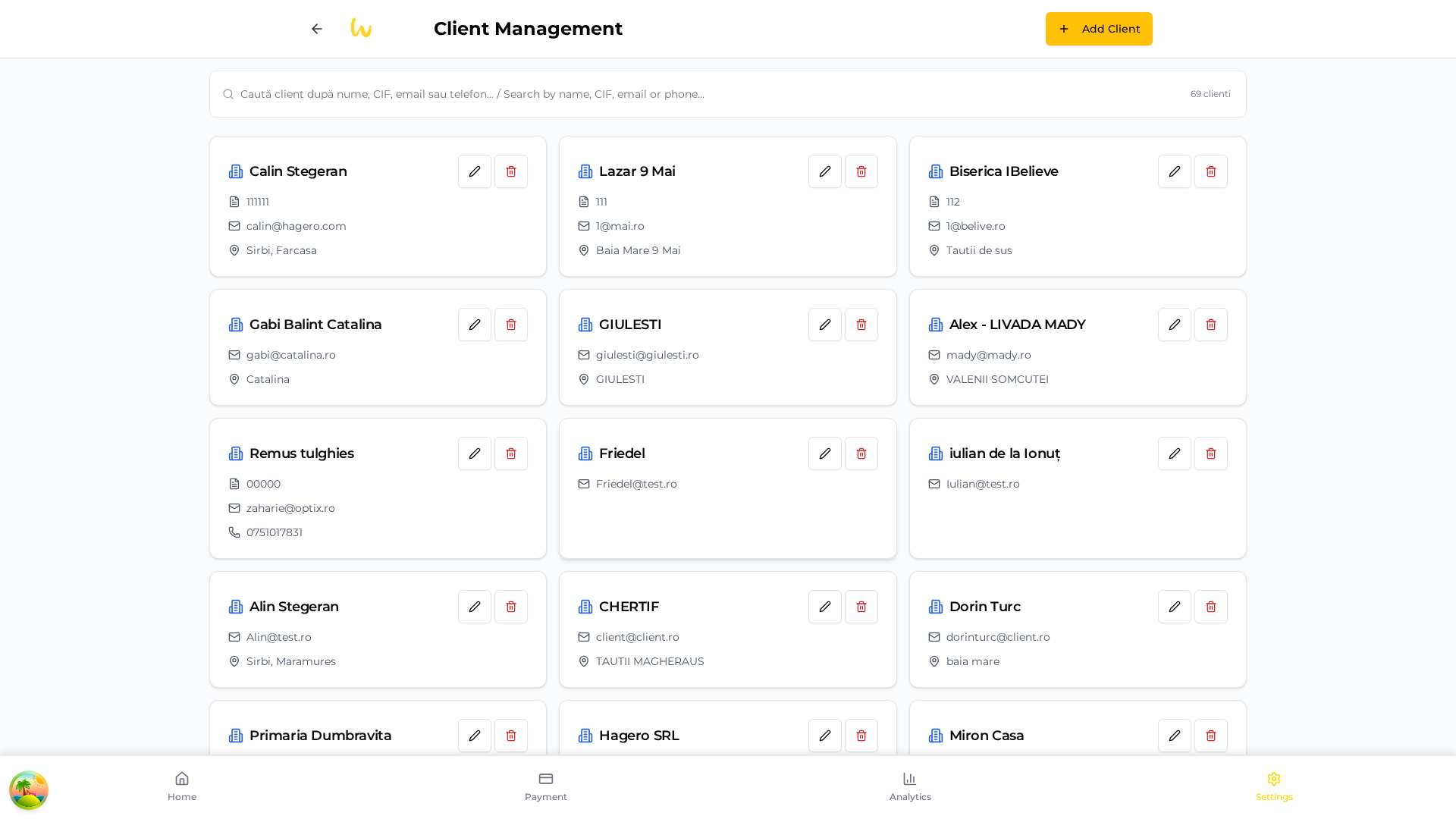
Client grid with compact cards: company name, VAT ID, email, phone, address. Icons ✏️ Edit · 🗑️ Delete.
The search bar filters instantly by name / VAT / email / phone. + Add Client button (top-right) for new clients.
Recommendation: Setmarkupto 35–45% to cover indirect costs. Clients withoutbilling_rateormarkupdon't generate estimated revenue in the monthly brief.
8. Team / Users
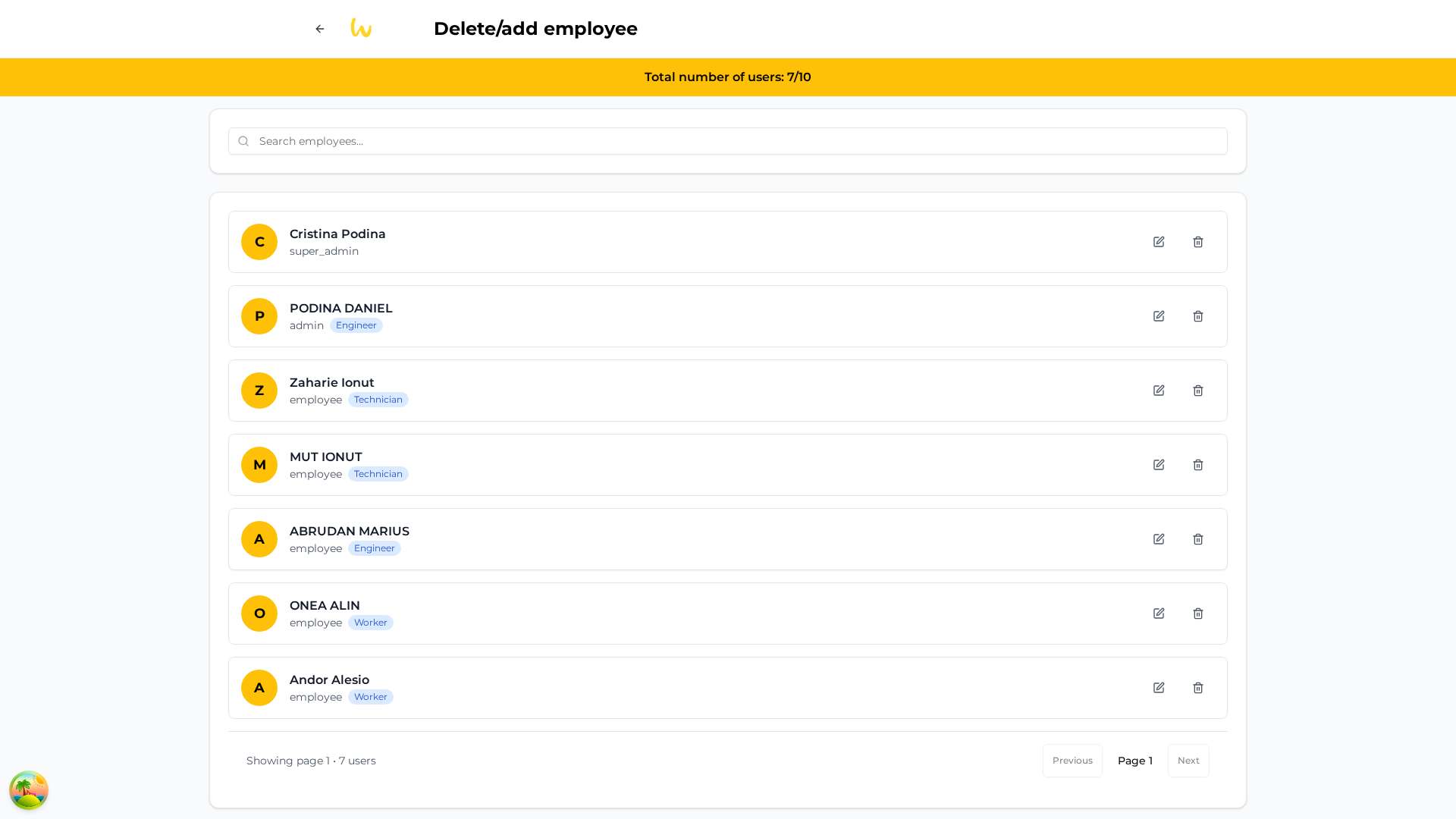
The /users screen lists all company members with initial, full name, role and job title. The yellow banner shows "Total number of users: X/Y" — current vs. plan limit.
Roles and permissions
| Role | Key permissions |
|---|---|
super_admin | Everything — incl. platform settings, CMS, blog admin. |
admin | Company: clients, employees, reports, payments. |
manager | View team reports + export. |
employee | Just own daily timesheet + history. |
Tip: Add one additional admin besides you for operational continuity (vacations, emergencies).
9. Company Account — Company settings
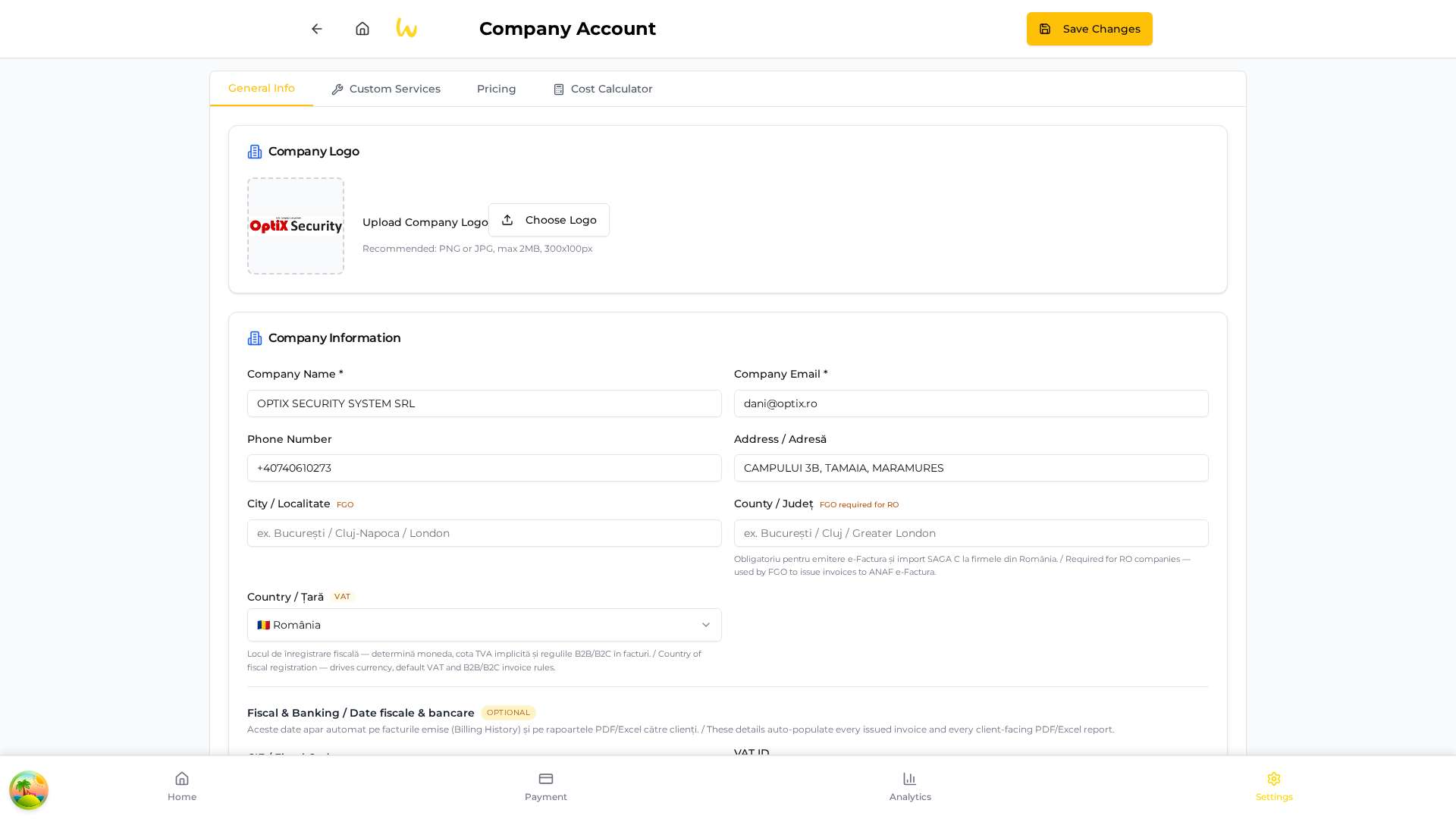
The configuration center. 4 tabs:
- General Info: Logo (PNG/JPG max 2MB, 300×100px recommended), name, email, phone, address, City + County (required for FGO e-Invoice), Country (drives currency + VAT), Fiscal & Banking (VAT ID, IBAN, bank).
- Custom Services: define your services with per-hour/per-intervention rate.
- Pricing: labor / km / consumables rates — used in Analytics and Executive Brief.
- Cost Calculator: internal margin calculator cost vs. quoted price.
Important: after any change, click "Save Changes". Empty fields no longer overwrite existing data (April 2026 fix).
10. Day-to-day recommendations for admins
Daily routine (5 min)
- 09:00: Check Dashboard → KPI cards. Confirm report count grows vs. yesterday.
- 18:00: Open Weekly Timesheet → look for ✗ on today's column. Call employees who haven't logged.
Weekly routine (15 min, Friday)
- Weekly Timesheet → Monthly: see who exceeded 40h/week (overtime).
- Analytics → Last Week: check Company Health + Utilization Rate.
- Email the report using the Email button in the Timesheet screen.
Monthly routine (zero effort 🎉)
On day 1 at 08:00 UTC, the Monthly Executive Brief auto-arrives in all admins' inbox. For preview, use "Test on me".
Common mistakes to avoid
- ❌ Don't leave
billing_rateempty — breaks all profit calculations. - ❌ Don't delete active employees — mark them inactive instead (history becomes orphan).
- ❌ Don't change the logo after sending reports — clients will see different versions.
11. Support & contact
- Website: https://workapp.ro
- Support email: office@workapp.ro
- Blog & guides: workapp.ro/about/blog
- Terms: /terms · Privacy: /privacy
Active integrations
SendGrid (transactional email), Stripe (subscriptions), FGO (ANAF e-Invoicing), BNR & VIES (FX rates + EU VAT validation).
© WorkApp.ro 2026. "The best management tool for service companies with field teams."